Architecture
Evie Platform turns OpenClaw from a generic agent runtime into a personal AI agent. The architecture has two dimensions: the platform layers that add capabilities on top of OpenClaw, and the deployment layers that provision and personalize a running agent.
Platform Overview
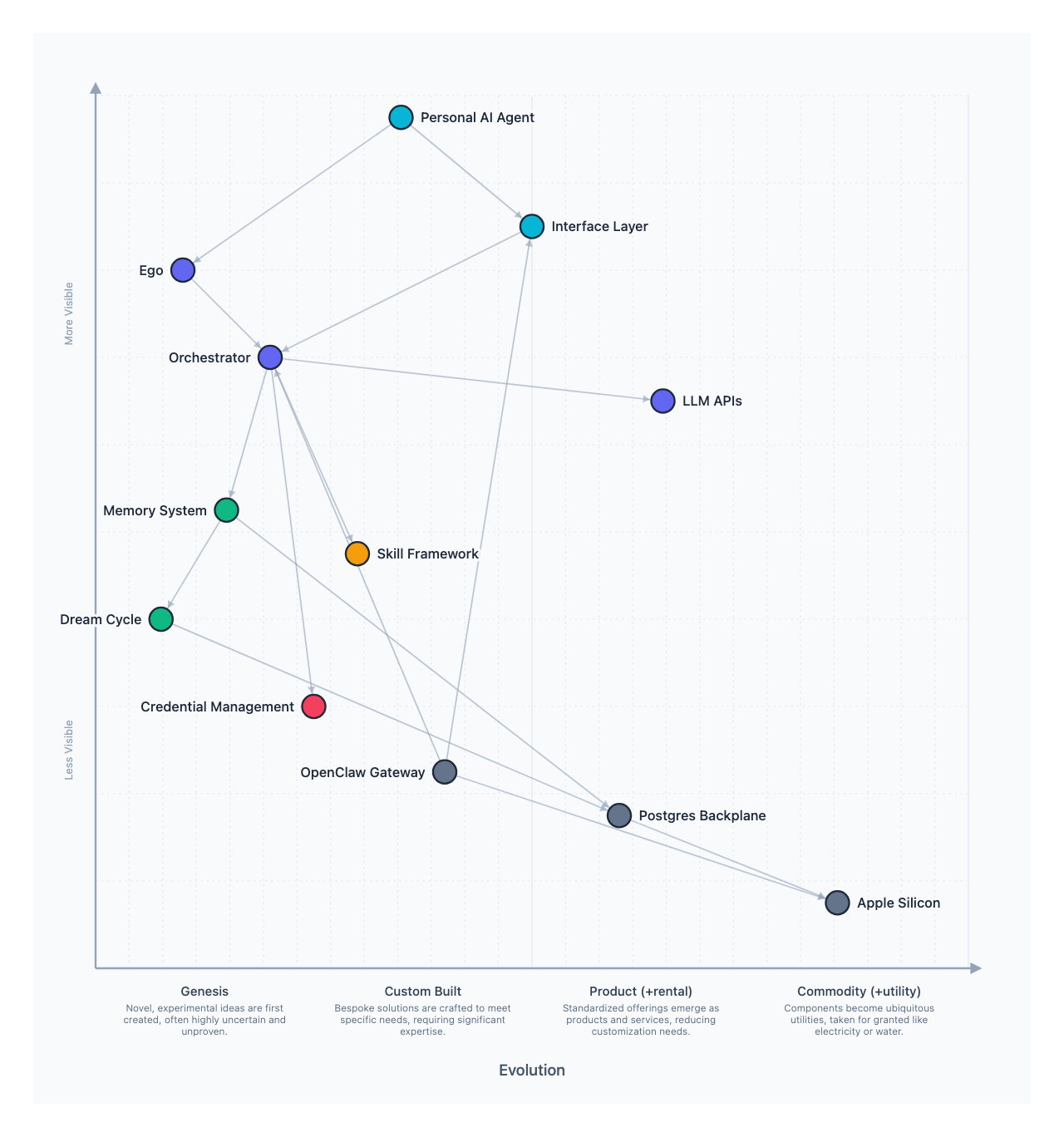
OpenClaw provides the agent runtime: a gateway daemon, message routing across channels, tool execution, and the SOUL.md personality system. Evie Platform adds five subsystems on top:
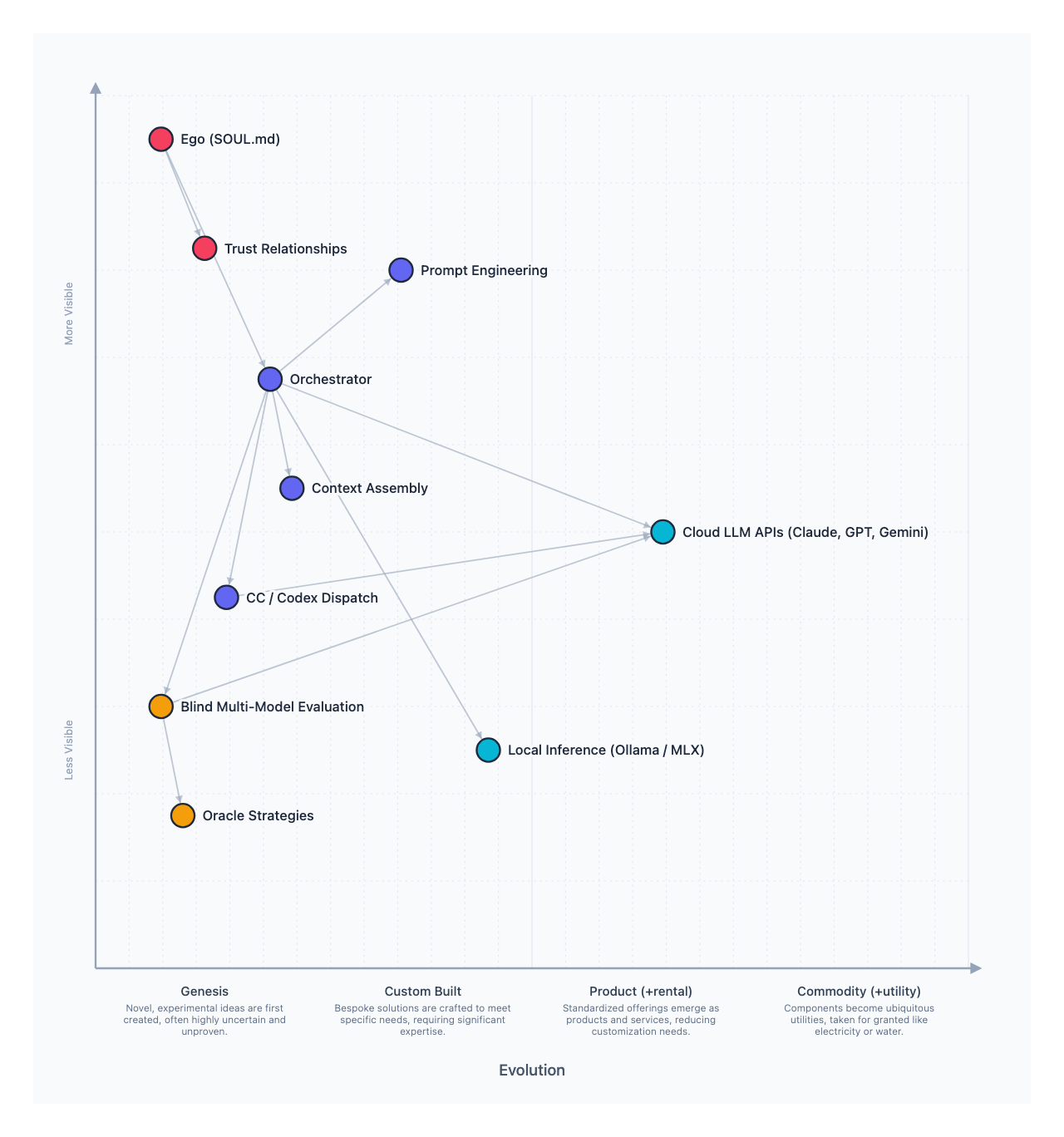
- Reasoning and Orchestration -- Ego (identity governance), blind multi-model evaluation (swap between Anthropic, OpenAI, Google without changing behavior), and CC/Codex Dispatch for bidirectional agent-to-CLI orchestration via tmux
- Memory System -- A five-layer model (episodic, identity, topical, procedural, artifact) built on an activity log foundation, with hybrid search and overnight Dream Cycle consolidation
- Secrets and Security -- Progressive trust, agent-blind credential injection, four-tier risk model, and leak detection
- Skills and Extensibility -- SKILL.md convention, security-first custom skills, MCP bridge via mcporter
- Infrastructure -- Local-first on Apple Silicon, Postgres stack (pgvector + ParadeDB + TimescaleDB), Tailscale mesh networking
Each subsystem is documented in its own section. The rest of this page covers the deployment architecture: how you go from bare macOS to a running agent.
Two-Layer Deployment Design
┌─────────────────────────────────────────────┐
│           User Config Repo                  │
│  (github.com/username/agent-name)           │
│                                             │
│  evie.config.json, Brewfile, workspace/, │
│  skills/, ansible/, shell/, scripts/        │
├─────────────────────────────────────────────┤
│           Evie Platform (Base)                    │
│  (github.com/Spantree/evie-platform)     │
│                                             │
│  Ansible roles: homebrew, mise, node,       │
│  docker, openclaw, ssh, tailscale,          │
│  workspace, supabase                        │
└─────────────────────────────────────────────┘
         ▼            ▼            ▼
    macOS Tahoe   OpenClaw    Agent Workspace
Layer 1: Base Platform
The base platform is opinionated and turnkey. Every Evie Platform agent runs the same set of roles, and the playbooks are idempotent — run them again anytime to converge.
System foundations come first: Xcode CLI tools, Rosetta on Apple Silicon, and Homebrew with core CLI packages. These rarely change but need to be present before anything else.
Runtime tooling follows: mise for version management, Node.js and Bun for OpenClaw's runtime, and Git with sensible defaults (auto-setup remote, rerere, diff3 merge style).
OpenClaw itself is installed globally via npm, with the gateway configured as a launch agent that starts on boot and survives reboots.
Infrastructure services round out the base: Docker via Colima (not Docker Desktop), Supabase running in Compose with pgvector and pg_trgm extensions, and Tailscale for secure tunnel access.
Security hardening locks down SSH to key-only authentication with no root login, and the workspace directory structure is scaffolded at ~/.openclaw/workspaces/main/ with memory/, knowledge/, and skills/ subdirectories.
Layer 2: User Config Repo
The config repo is where personalization lives. It can be public (a shared team config like myorg/evie-config) or private (a specific agent's setup like divideby0/evie). Evie Platform discovers a known directory structure and applies it automatically after the base completes.
See the Config Repo Guide for the full directory structure and evie.config.json reference.
Bootstrap Sequence
The bootstrap runs as a single Ansible playbook with two phases. The base phase installs all core infrastructure. The overlay phase clones and applies the user config repo if one is specified.
1. Pre-flight checks (macOS version, Xcode CLI, Rosetta)
2. Base platform roles:
   homebrew → shell → node → docker → openclaw →
   ssh → tailscale → workspace → supabase
3. If config repo specified:
   a. Clone config repo → ~/.evie/config
   b. Merge group_vars (user overrides base)
   c. Re-run base with merged vars (idempotent)
   d. Install extra Homebrew packages from Brewfile
   e. Install extra mise tools
   f. Copy skills/ → ~/.openclaw/skills/
   g. Copy workspace/ → ~/.openclaw/workspaces/main/
   h. Install shell overlays
   i. Start user docker-compose services
   j. Start skill docker-compose services
   k. Run user ansible/playbooks/* in order
   l. Run scripts/* in alphabetical order
4. Start OpenClaw gateway
5. Print next steps (openclaw pair)
Merge Behavior
When a config repo overlays the base, different file types merge differently. The goal is predictable behavior where the user's choices always win on conflict.
| Item | Behavior |
|---|---|
group_vars/all.yml | Deep-merged with base. User values win on conflict. |
Brewfile | Appended to base packages. Homebrew handles deduplication. |
mise/config.toml | Merged with base tools. User versions override base versions. |
workspace/ | Copied into ~/.openclaw/workspaces/main/. Overwrites existing files. |
skills/ | Copied into ~/.openclaw/skills/. Shared across all workspaces. |
shell/ | Installed as overlays (zshrc.local sourced from .zshrc). |
ansible/playbooks/ | Run after base bootstrap. Entirely user-controlled. |
ansible/roles/ | Available to user playbooks only. Not mixed into base. |
scripts/ | Run in alphabetical order after everything else. |
Security Model
Credentials never live in the config repo. Use a secrets backend (1Password CLI is the default) to inject credentials at bootstrap time. The credentials/ directory in the config repo is for instructions and templates only, never actual secrets.
SSH is locked down to key-only authentication with password auth and root login disabled. The base playbook configures this automatically, and the SSH hardening role runs on every bootstrap to ensure the settings haven't drifted.
Config repos can be public or private. Public repos work well for shared team configurations that don't contain workspace files. Private repos hold agent-specific content like SOUL.md and require the agent's SSH key or a GitHub token to clone.
Networking
Secure tunneling is required for every Evie Platform deployment. Agent machines run services (Supabase Studio, dev servers, the OpenClaw gateway) that should never be exposed on the open network, and you need reliable remote access for management.
Tailscale is the default tunnel provider and the first one Evie Platform supports. It's installed as part of the base platform, not as an optional feature. After bootstrap, the agent machine must be joined to a tailnet via auth key or interactive login.
Tailscale was chosen for practical reasons. Zero-config mesh networking means agent machines are reachable by hostname without port forwarding or dynamic DNS. MagicDNS gives you agent-mac.tailnet.ts.net out of the box. ACLs control who can reach the machine and which ports are open. And Tailscale Serve/Funnel lets you expose specific services without touching the firewall.
Future tunnel providers (Cloudflare Tunnel, WireGuard) can be added as alternatives, but every deployment must have at least one configured via backends.tunnel in evie.config.json.