Service Architecture
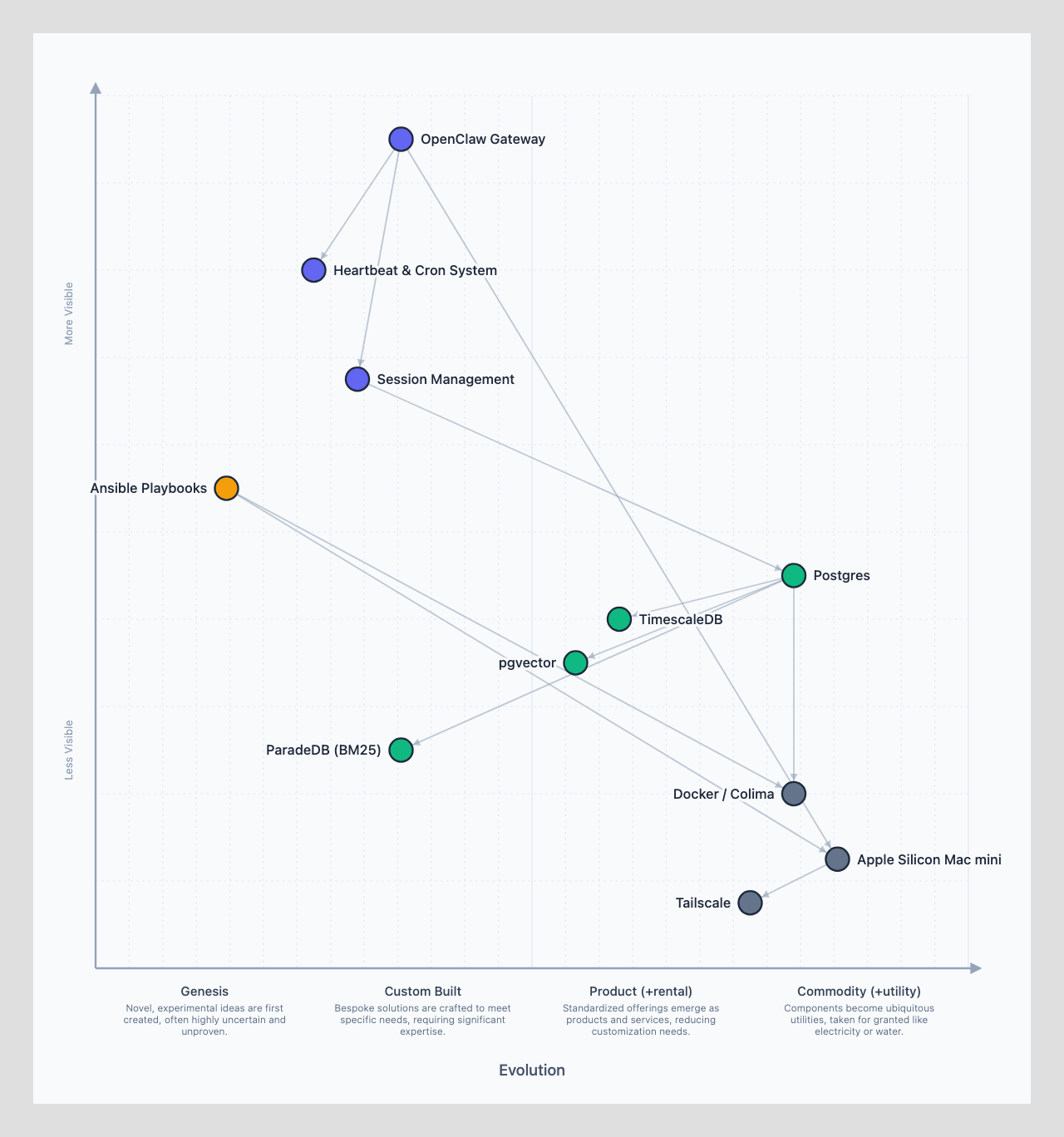
Evie Platform uses Docker Compose as its service layer. The base platform ships required services (Supabase). Skills can add optional services via their own compose files. Each skill runs its own independent compose project — no merging, no assembly.
Design Principles
One compose file per concern. The base platform has its own docker-compose.yml for Supabase. Each skill that needs infrastructure has its own at the skill root. User config repos can add one too. They're all independent projects — no merging, no assembly.
Ansible orchestrates, Compose runs. Ansible's job is discovering compose files and running docker compose up. Compose handles the actual container lifecycle — networking, volumes, health checks, restarts. This separation means you can always docker compose directly for debugging.
Skills own their services. If a skill needs SonarQube, it ships a docker-compose.yml. Evie Platform doesn't know or care what SonarQube is. It just sees a compose file, starts the containers, and moves on.
Everything survives restarts. Every service uses restart: unless-stopped so Docker brings them back when Colima starts. Colima itself runs as a launchd agent that starts on boot. The only way a service stays down is if you explicitly docker compose down it.
Graceful degradation is the norm. If a service isn't running, skills that depend on it skip those strategies and report what was unavailable. A missing SonarQube container doesn't crash the code review skill — it just means static analysis is skipped while native review and Claude Code dispatch still run.
Base Services
Every Evie Platform agent runs these services. They're defined in the base platform's compose file:
# ~/.evie/base/docker-compose.yml
services:
  supabase-db:
    image: supabase/postgres:15.6.1.143
    container_name: evie-supabase-db
    ports:
      - "${SUPABASE_DB_PORT:-65432}:5432"
    volumes:
      - supabase-db-data:/var/lib/postgresql/data
      - ./services/supabase/migrations:/docker-entrypoint-initdb.d
    environment:
      POSTGRES_PASSWORD: ${POSTGRES_PASSWORD}
      POSTGRES_DB: postgres
    restart: unless-stopped
    healthcheck:
      test: ["CMD-SHELL", "pg_isready -U postgres"]
      interval: 10s
      timeout: 5s
      retries: 5

  supabase-studio:
    image: supabase/studio:latest
    container_name: evie-supabase-studio
    ports:
      - "${SUPABASE_STUDIO_PORT:-65433}:3000"
    environment:
      STUDIO_PG_META_URL: http://supabase-meta:8080
      SUPABASE_URL: http://supabase-kong:8000
    depends_on:
      supabase-db:
        condition: service_healthy
    restart: unless-stopped

volumes:
  supabase-db-data:
What Supabase Provides
Supabase is the backbone for all structured data:
| Layer | What it stores | Postgres features used |
|---|---|---|
| Knowledge | basic-memory entities, relations, embeddings | pgvector, tsvector, pg_trgm |
| Activity | Slack messages, meeting transcripts, calendar events | FTS, JSONB |
| Identity | People crosslinks, match candidates (MDM) | Foreign keys, indexes |
| Agent state | Session metadata, credential references | Standard tables |
The base platform runs migrations on first boot to set up the required schemas, extensions (pgvector, pg_trgm), and tables.
Skill Services
Each skill with infrastructure needs ships a docker-compose.yml at the skill root. It runs as its own independent compose project.
skills/
└── code-review/
    ├── SKILL.md
    ├── evie.config.json
    ├── docker-compose.yml      # right at the root, not buried
    └── scripts/
        └── review.ts
Example: Code Review Skill
# skills/code-review/docker-compose.yml
services:
  sonarqube:
    image: sonarqube:community
    container_name: evie-sonarqube
    ports:
      - "9000:9000"
    volumes:
      - sonarqube-data:/opt/sonarqube/data
    environment:
      - SONAR_ES_BOOTSTRAP_CHECKS_DISABLE=true
    restart: unless-stopped

volumes:
  sonarqube-data:
Example: Monitoring Skill
# skills/monitoring/docker-compose.yml
services:
  grafana:
    image: grafana/grafana-oss
    container_name: evie-grafana
    ports:
      - "3000:3000"
    volumes:
      - grafana-data:/var/lib/grafana
    restart: unless-stopped

  prometheus:
    image: prom/prometheus
    container_name: evie-prometheus
    ports:
      - "9090:9090"
    volumes:
      - ./prometheus.yml:/etc/prometheus/prometheus.yml
    restart: unless-stopped

volumes:
  grafana-data:
Three Tiers, Same Convention
Docker Compose files can exist at three levels, all running independently:
| Tier | Location | Purpose | Required? |
|---|---|---|---|
| Base | evie-platform/docker-compose.yml | Supabase, core infrastructure | Yes |
| User | <config-repo>/docker-compose.yml | User's extra services (Redis, Ollama, etc.) | No |
| Skill | skills/<name>/docker-compose.yml | Skill-specific services (SonarQube, Grafana, etc.) | No |
Each runs as its own compose project. No merging, no multi-file assembly:
# Start base services
cd ~/.evie/base && docker compose up -d

# Start a skill's services
cd ~/.openclaw/skills/code-review && docker compose up -d

# Update a skill's services (without touching anything else)
cd ~/.openclaw/skills/code-review && docker compose pull && docker compose up -d

# Remove a skill's services
cd ~/.openclaw/skills/code-review && docker compose down -v

# Check what's running across all projects
docker ps --filter "name=evie-"
This means installing, updating, or removing a skill's infrastructure never affects the base platform or other skills.
Container Naming Convention
All Evie Platform-managed containers use the evie- prefix:
evie-supabase-db
evie-supabase-studio
evie-sonarqube
evie-grafana
This avoids conflicts with any other Docker workloads on the machine and makes it easy to list all Evie Platform services with docker ps --filter "name=evie-".
Environment Variables
Service configuration uses environment variables, stored in ~/.evie/.env:
# Base services
POSTGRES_PASSWORD=<generated-on-first-boot>
SUPABASE_DB_PORT=65432
SUPABASE_STUDIO_PORT=65433

# Skill services (added as skills are installed)
SONAR_HOST_URL=http://localhost:9000
SONAR_TOKEN=<generated-after-sonarqube-init>
Ansible generates the .env file during bootstrap. Skill infra playbooks append their variables.
Docker Runtime
Evie Platform uses Colima as the Docker runtime on macOS — lightweight, CLI-native, no GUI dependency:
# ansible/roles/docker/defaults/main.yml
docker_runtime: colima
colima_cpu: 4
colima_memory: 8
colima_disk: 60
colima_mount_type: virtiofs
The base platform installs Colima via Homebrew and starts it with appropriate resource limits. Docker Desktop is explicitly not used — it has permission issues with agent user home directories and requires a GUI session.
Surviving Restarts
Every service must survive a machine reboot. This requires two things:
1. Colima Starts on Boot
Ansible installs a launchd agent that starts Colima automatically:
<!-- ~/Library/LaunchAgents/com.evie.colima.plist -->
<plist version="1.0">
<dict>
    <key>Label</key>
    <string>com.evie.colima</string>
    <key>ProgramArguments</key>
    <array>
        <string>/opt/homebrew/bin/colima</string>
        <string>start</string>
        <string>--foreground</string>
    </array>
    <key>RunAtLoad</key>
    <true/>
    <key>KeepAlive</key>
    <true/>
</dict>
</plist>
2. Containers Restart Automatically
Every docker-compose.yml (base and skill) must use restart: unless-stopped on all services. This ensures Docker restarts them when Colima comes up after a reboot.
The only way a service stays down is if you explicitly docker compose down it.
Lifecycle Commands
# Base platform
cd ~/.evie/base && docker compose up -d
cd ~/.evie/base && docker compose down
cd ~/.evie/base && docker compose logs -f supabase-db

# Skill services (each skill independently)
cd skills/code-review && docker compose up -d
cd skills/code-review && docker compose down
cd skills/code-review && docker compose logs -f sonarqube

# See all Evie Platform services
docker ps --filter "name=evie-"
Ansible's Role
Ansible handles the orchestration of Docker Compose, not the containers themselves:
| Ansible does | Docker Compose does |
|---|---|
| Install Colima + Docker CLI | Run containers |
| Discover skill compose files | Network between services |
Generate .env with credentials | Mount volumes |
Run docker compose up -d | Health checks |
| Run migrations after DB is healthy | Restart policies |
This separation means you can always docker compose directly for debugging, and Ansible re-runs are idempotent.